Macro Player
The macro player key executes recorded keyboard and mouse macros when pressed.

In the FlexDesigner
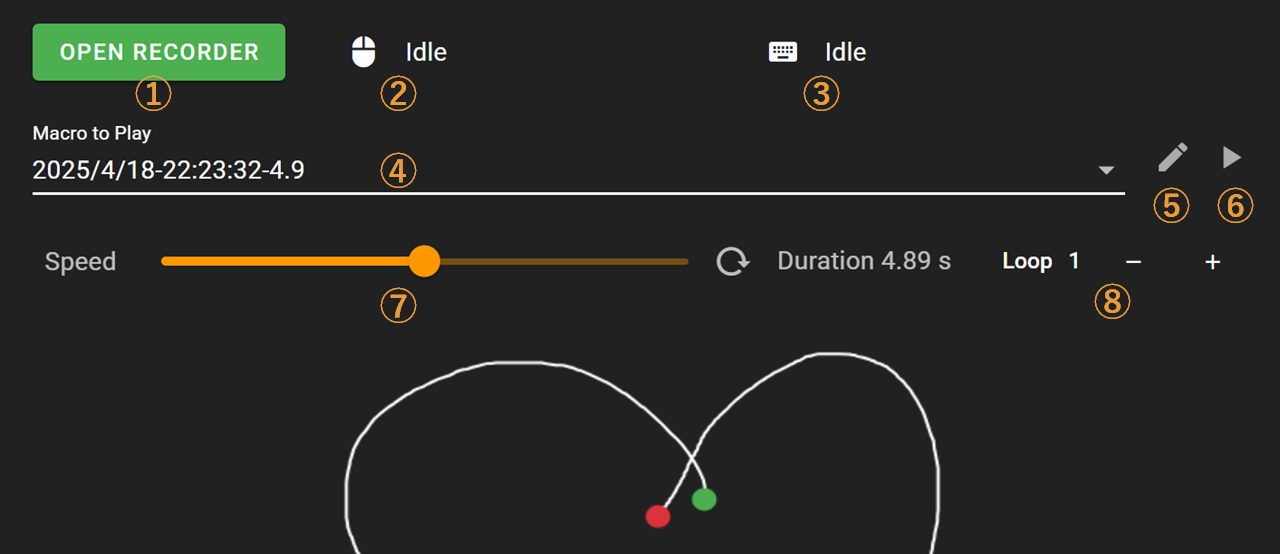
Open the recorder interface on Flexbar
Current mouse coordinates
Currently pressed keys
Select a saved recording
Edit/delete recordings
Test the selected recording, Note: clicking this will immediately play your recorded macro
Adjust playback speed
Set the number of times to play the recording
Click OPEN RECORDER to start recording a macro. You’ll need to complete the recording on your Flexbar.

Start/Stop recording
Recording duration (MM:SS)
Current mouse coordinates
Currently pressed keys
Save this recording
Play/Stop this recording
After saving your recording, it will appear in the Function Tab where you can select and use your previously recorded macros.
Once you’ve selected a recorded macro and uploaded it to your Flexbar, simply press this key on your Flexbar to play the macro.